A digital tool for a traditional craft
I took up embroidery to make my own wedding rushnyk, the embroidered linen cloth a Ukrainian couple stands on during the ceremony and keeps for the rest of their life. Charts for one are hard to find, and the tools that make charts from photographs gave me results I would not put on fabric: unstitchable, impossible to correct by hand, and usually behind an account or a payment. I built Stitchka in five weeks and it is live, organised around one rule: every control is grouped by whether it changes the thread on the cloth or only the drawing on the screen. There is no usage to report yet, and this case says what there is instead.
- Product
- Stitchka, a free browser tool that turns a photo into a cross stitch chart, with a plain language embroidery guide around it. My own project, live at stitchka.com.
- Platforms
- Web, in Ukrainian and English. Everything runs in the browser: no upload, no account, nothing to install.
- My role
- All of it: the product, the information architecture, the visual system, the copy in both languages, and the search work. The code is vibecoded under my decisions, and I am not presenting this as engineering work.
- Team
- Nobody else. No PM, no engineers, no researcher, and no second designer to argue with.
- Duration
- Five weeks, 12 September to 19 October 2026
- The constraint
- One person working evenings, no budget for distribution, and an audience for whom the word AI is an accusation rather than a feature.
- Outcome
- Live, and measured by discovery rather than usage: 44 clicks from Google in the 28 days to 16 October 2026, with the builder averaging position 6.1.
Outcome
Five weeks to a live site, and reach as the only result so far.
5 weeks
from an empty repository to a live product
12 September to 19 October 2026, working evenings.
2 languages
Ukrainian written first, English typed from its shape
23 pages, including eight guide articles in each language.
44 clicks
from Google in the 28 days to 16 October 2026
Discovery is the measure I set for this project before there were any numbers to pick from. Usage is not reportable yet, and the full picture with its caveats is at the end of this case.
Where it came from
I started from one object I wanted to make, and no way to get a chart for it.
I took up embroidery to make one specific thing: a rushnyk for my own wedding. For anyone who has not met the tradition, a rushnyk is a long embroidered linen cloth, and the wedding one is the cloth the couple stands on during the ceremony. It is not decoration and it is not put away afterwards. It is kept for the rest of your life and often handed down, and a large part of its meaning is that somebody embroidered it by hand for that one day. The patterns are regional, and families carry their own.
Charts for a piece like that are genuinely hard to find. So I went the other way and looked for something that would turn a picture into a chart, and what I found did not survive contact with fabric. The automatic result came back as confetti: stray single cells in colours nobody is going to thread a needle for. Where the algorithm misread a face or an outline there was no way in to correct it by hand. And the tools that did more than that wanted an account, a payment, or my photograph uploaded to somebody else’s server.
So the problem was mine before it was a product. The first thing I built was not an interface but one HTML file answering a single question: does a usable chart come out of a photograph at all? It did. That prototype is still in the repository as a reference for the maths, and nothing else of it survived into what shipped.
The evidence
Three complaints, and all of them are mine
The result was not stitchable
Dozens of colours and single isolated cells scattered through the grid, because the quantization optimised for looking like the photo rather than for being worked with a needle.
You find out that it will not work after you have already bought the thread for it.
I could not correct it by hand
The algorithm gets faces, eyes and outlines wrong, which is expected. What is not acceptable is having no way to repaint the cells it got wrong.
This is the complaint that decided the shape of the product: the automatic pass is a draft, not an answer.
The usable ones had a toll gate
Register, pay, install desktop software from another decade, or hand your photograph to a server you know nothing about.
For a hobby project on an evening, any one of these is enough to stop.
Starting conditions
Three things that were true before I wrote anything
- The audience treats AI as an accusation
- Fibre and craft communities are actively hostile to AI generated craft, and those communities are exactly who decides whether a tool gets recommended. The honest answer happens to be the strong one: this generates nothing. It counts the pixels of the picture you already have, in your own browser, and the same image always returns the same chart.
- The reward is months away
- A 200 by 300 chart is 60,000 stitches. At the 200 to 400 stitches an hour my own guide quotes, that is months of evenings. A product that sells only the beginning of a project loses people in the middle, so everything here points at small finishable sizes.
- One person, evenings, no distribution
- No PM to push back, no engineer to tell me a decision was expensive, no budget to buy an audience. That makes search the only channel, which is why I wrote down discovery rather than usage as the measure of success before there was anything to measure.
The reframe
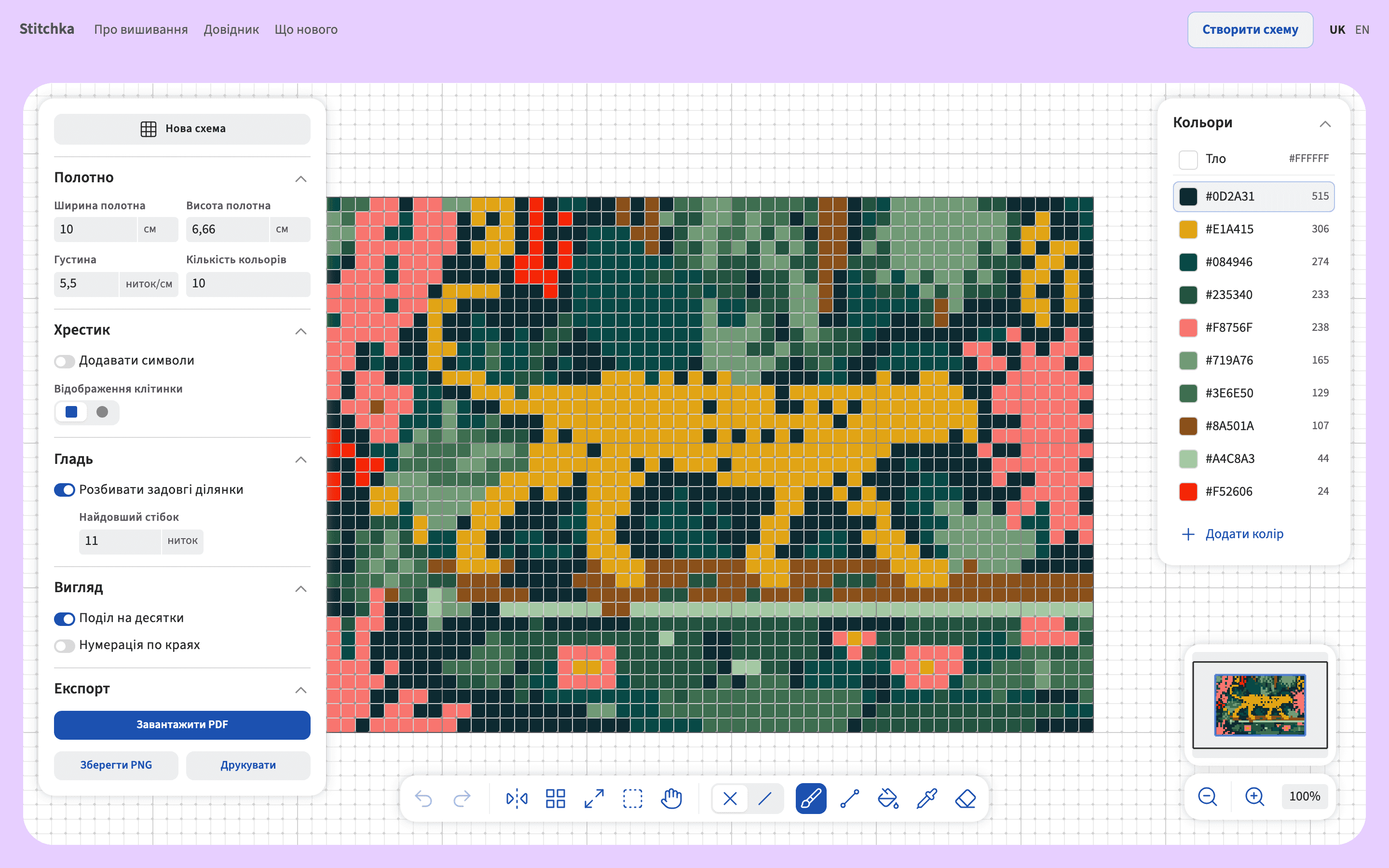
The panel is not a list of settings. It is two kinds of setting that look identical.
Framed as
A chart tool needs controls: size, fabric, colours, symbols, zoom, numbering. Group them by topic, put everything about size together, and the panel is done.
Reframed as
Every control answers one question before anything else: does changing this change the thread on the cloth, or only the drawing on the screen? Fabric density belongs with the embroidery, because centimetres come out of it. Division into tens and edge numbering belong with the chart, because the thread knows nothing about them.
The two kinds behave differently in the one way that matters to the person using it. Chart side controls are always safe, even mid edit. Cloth side controls rebuild the chart from the photo, which burns the cells you corrected by hand. My own prototype had the failure in its purest form: two sliders that moved the same value, one in a panel called chart display and one above the canvas, and nothing anywhere telling you which controls would destroy your work.
What it fixed
Four things the first version got wrong, and what each one cost
Two sliders for one value
Zoom appeared both among the settings and above the canvas, as though they were different things.
Zoom changes nothing about the finished work, so it does not belong among the controls that do.
One block held three different things
Stitches, centimetres and fabric sat together because they all sound like size.
They are not one thing. The stitch count is the chart, the density is the fabric, and the centimetres are what you get by dividing one by the other.
The technique switch quietly renamed other blocks
Choosing satin rewrote labels in three unrelated sections of the panel.
That is a mode behaving like an ordinary setting. Each stitch type now has its own block, and both can live in one chart.
Nothing marked the destructive controls
There was no way to tell which settings would erase the cells you had just corrected by hand.
This is the one the regrouping only half solves. The grouping tells you which side a control is on, but the dialog that offers to keep your manual edits through a rebuild is specified and not yet built.
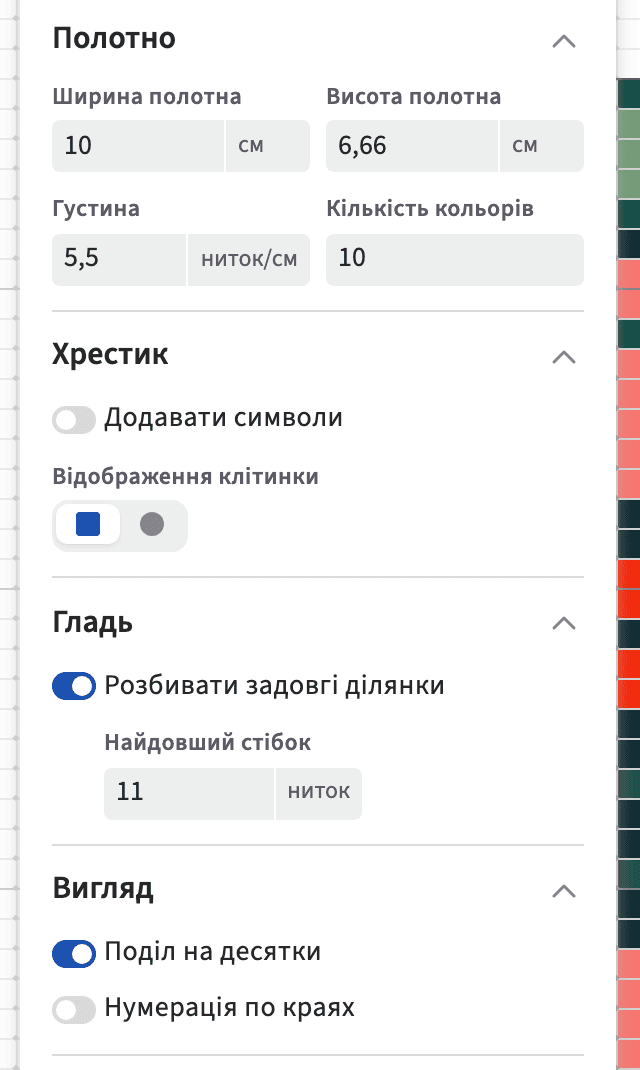
The grouping as it shipped. Size, density and colour count sit together because they decide what ends up on the fabric. Tens and edge numbering sit apart, in a block that cannot touch your work.
The design
The automatic pass is a draft, so the correcting came first.
Photo in, chart out is the easy half, and every tool has it. What decides whether a chart gets stitched is the half after: a colour count that turns confetti into shapes a needle can follow, a cleanup pass that absorbs stray single cells into the patch around them without letting an eye dissolve into the cheek beside it, and then real tools for everything the algorithm still got wrong.
The arithmetic is the same everywhere. Centimetres come from stitches divided by fabric density, in the builder and in the guide articles, which run the same functions as the tool. An article cannot drift away from what the product actually does, because there is only one piece of maths to drift from.
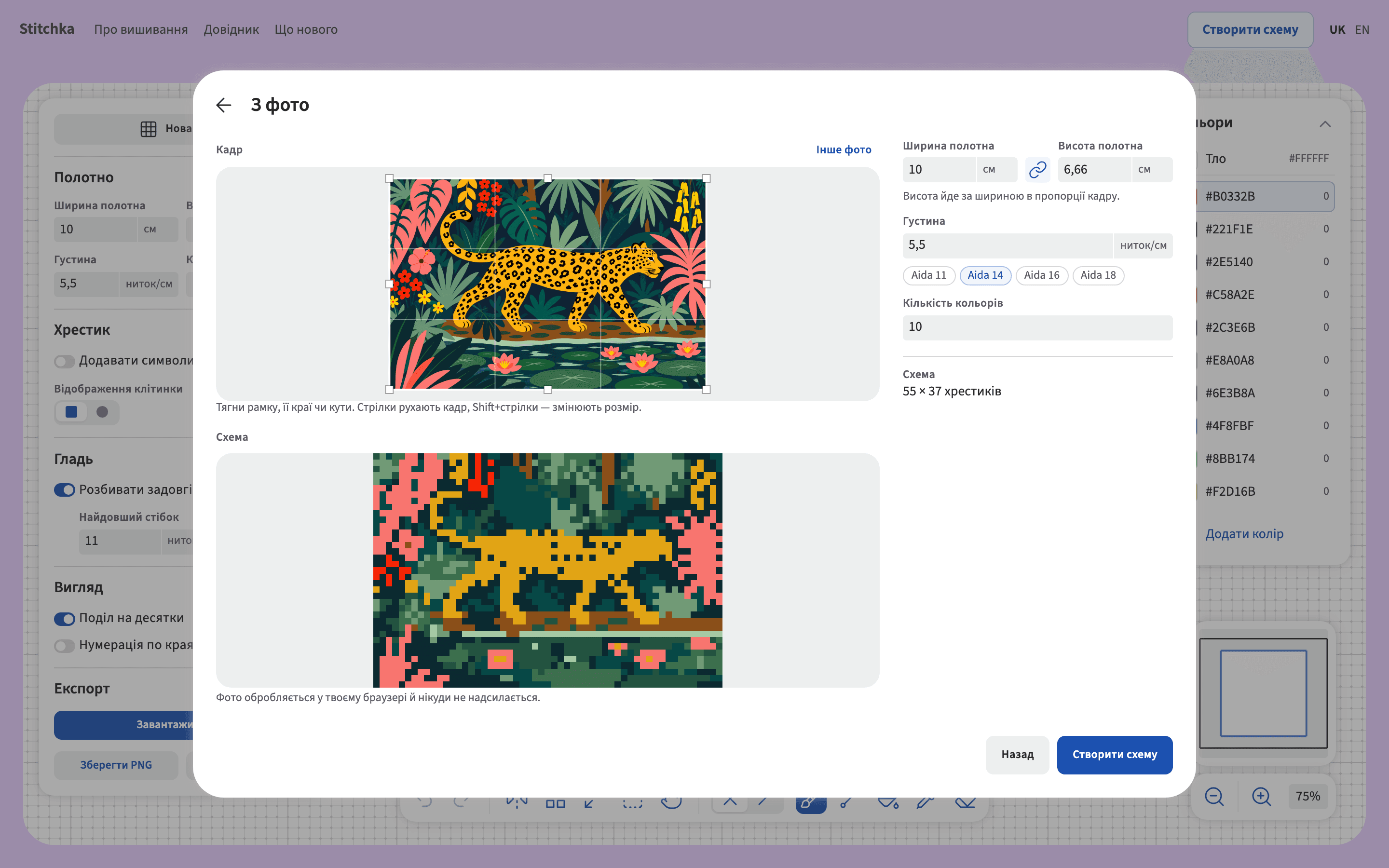
One dialog holds the whole decision. Crop on the left, fabric and colour count on the right, the chart that comes out of them underneath, and the size in stitches updating as you move anything. The line under the preview is the privacy promise, made at the moment the photo is dropped rather than in a footer.
Key decisions
Each decision answers one of the three complaints
Colour count first, then a cleanup pass
The chart is quantized to a number of colours you choose, and a cleanup absorbs stray single cells into the patch around them while keeping contrasting details intact.
This answers the confetti. Ten colours with clean edges is a chart somebody will thread.
Every cell is editable, with tools that deserve the name
Brush, line, fill, eyedropper and eraser, plus selection with copy, paste and flip, mirroring over a movable axis, pattern repeat, and undo and redo across all of it.
This answers the second complaint. The algorithm is a first pass and the tools are for the part it got wrong.
No account, no upload, no payment
The photograph is read in the browser and never leaves the device, and the promise is printed directly under the preview where the photo is dropped.
This answers the toll gate, and it is checkable rather than claimed: there is no sign up and no server to send anything to.
The fabric does the arithmetic
You give centimetres and a fabric, and the stitch count follows: 10 cm on Aida 14 is 55 stitches. Beads work the same way round, with the bead chosen to match the cell rather than the cell stretched to match the bead.
This is what makes a size statement trustworthy. Every number on the site traces back to density.
One chart model per physical reality
Cross stitch, half stitch and round beads all put exactly one element in one cell, so they produce an identical chart and share a single mode. Satin lays one long stitch across several cells, which is genuinely a different chart, so it is a separate stitch type that can still live in the same chart.
This is the switcher I did not build. A technique menu that changes a label and nothing else is a lie about what you are making.
Shortcuts read the physical key
B, L, G, I, E and V are read by key position rather than by character, so they work on a Ukrainian layout, and single character shortcuts can be turned off.
This is WCAG 2.1.4, and on a site whose first language is Ukrainian it is also simply correct.
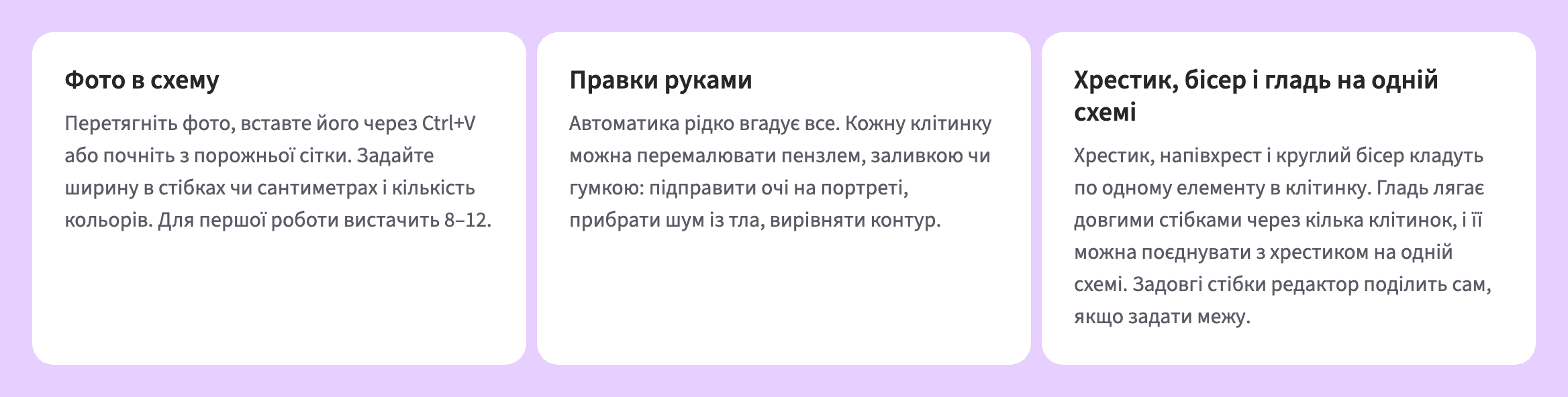
The same three answers on the home page, in Ukrainian, which is the language this product is written in first. Photo into a chart. Corrections by hand, because the automatic pass rarely gets everything. Cross stitch, beads and satin on one chart. The middle card is the one I would have left out a year ago.
Shipped
What it looks like when it works
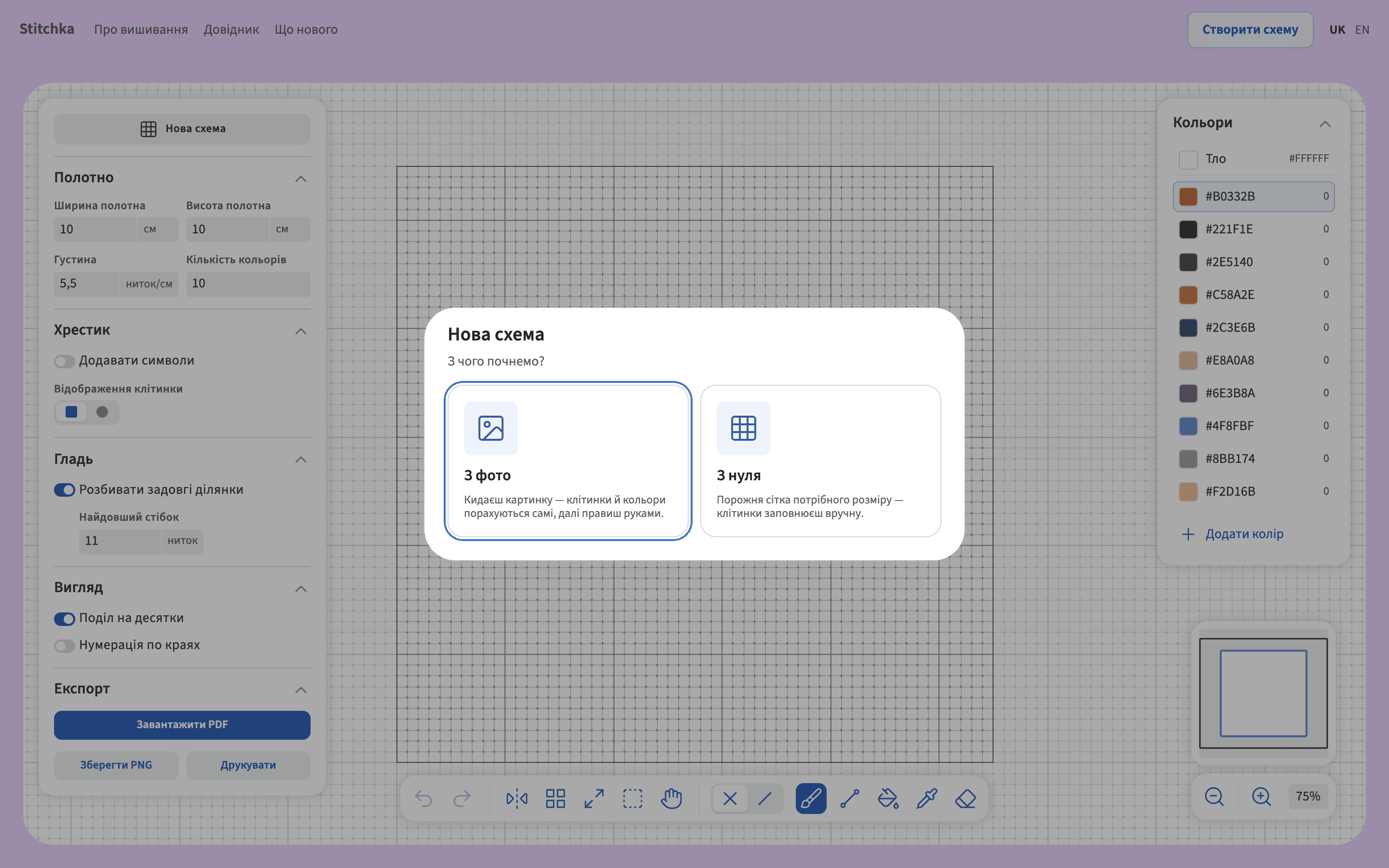
First run: from a photo, or from an empty grid
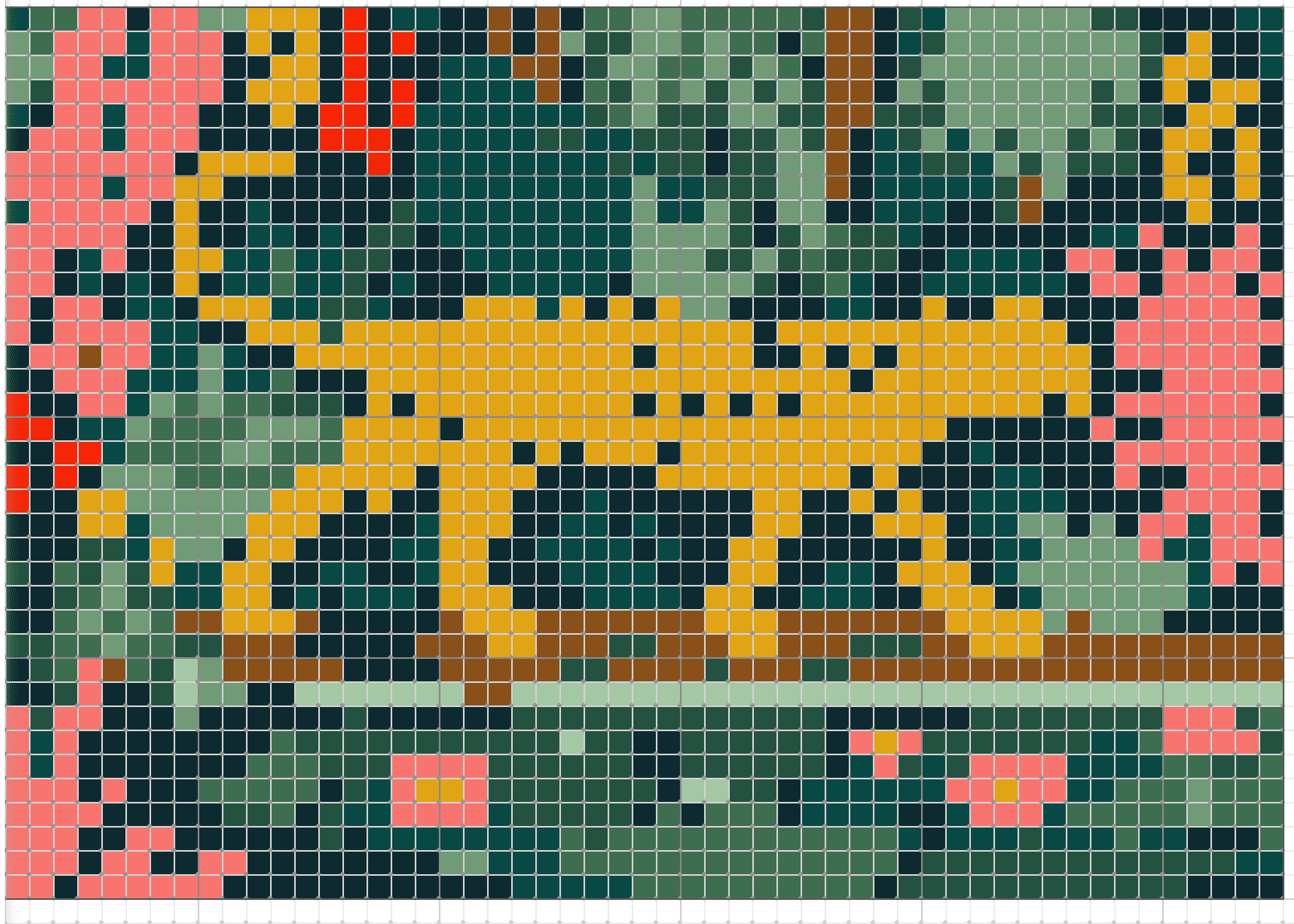
A bold line every ten cells, which is how stitchers count
The first thing a new visitor is asked, and the chart itself at working zoom.
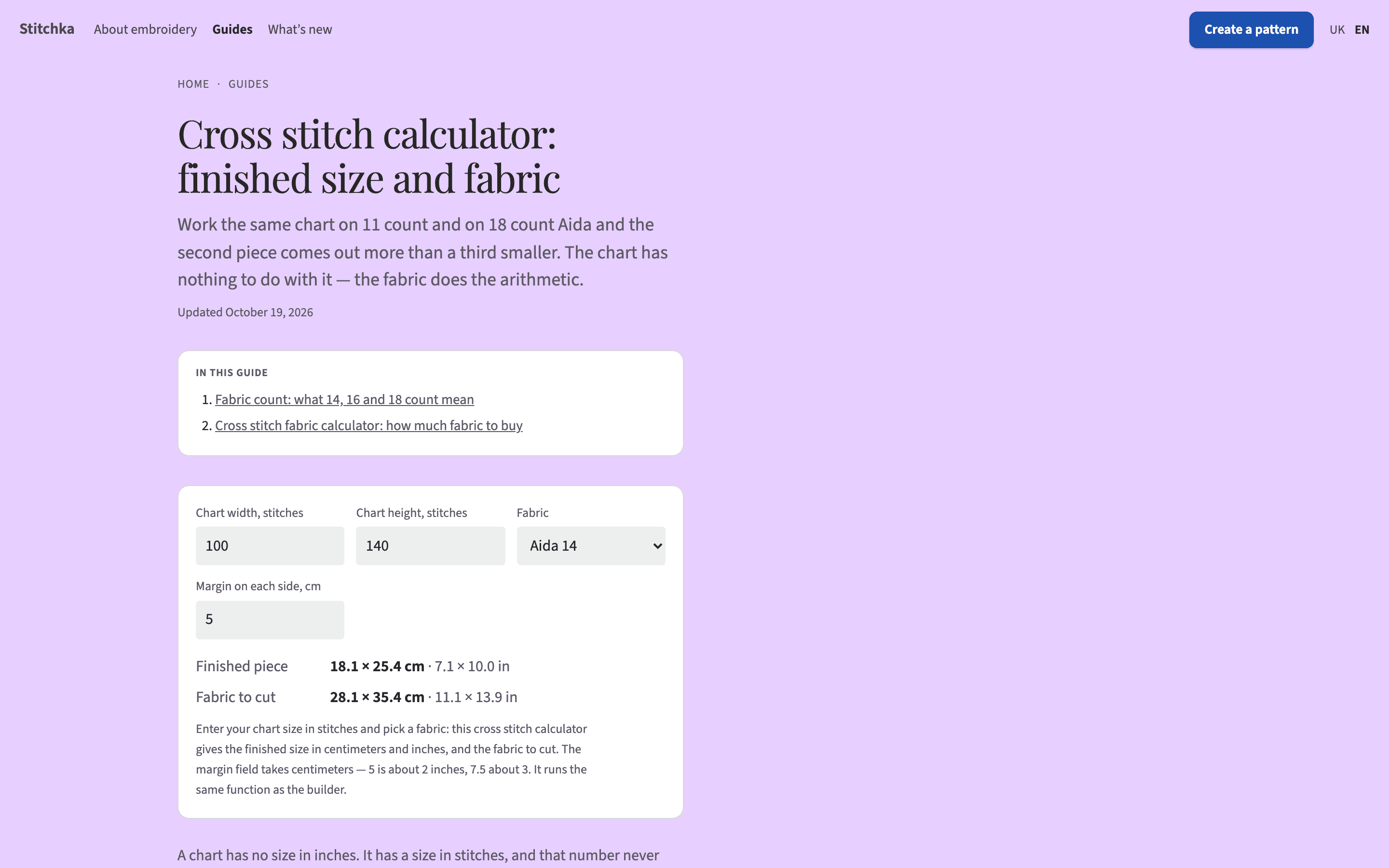
The guide side runs the builder’s own functions. This calculator and the tool divide stitches by density with the same code, so the article cannot quietly disagree with the product. It is also the page I rewrote on 19 October after the search results showed me it was written metric for an audience that buys fabric in inches.
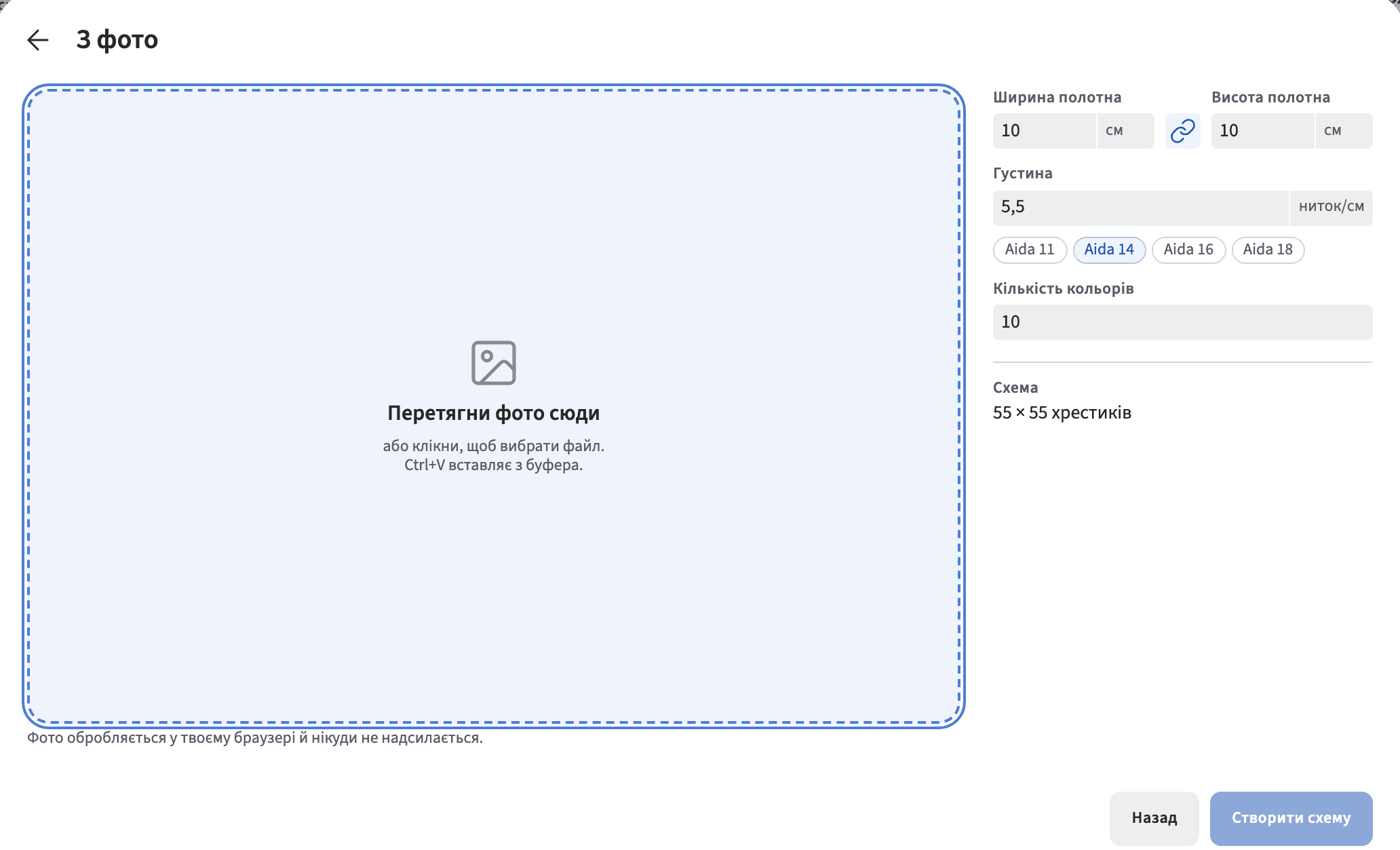
The state before there is anything to work with. The drop zone names all three ways in, the settings are already filled with defaults so the panel is never blank, the privacy line sits under the zone, and the primary button stays disabled until a photo exists. The gap is next door: push a file that is not an image at it and nothing happens and nothing is said. The file picker filters for images, so most people never meet that, which is exactly why I had not noticed it until I went looking while writing this.
Scope
What it does not do, and why I know
The legend gives hex values, not floss numbers
A stitcher in the United States buys DMC numbered thread. A chart carrying hex codes is not shoppable there.
I found this in my own code while writing the English positioning, after the English side was already built. It is a build item I have named rather than fixed.
The PDF is a single A4 page
A large chart does not tile across pages yet, so printing a big piece means scaling down or working from the screen.
The canvas cannot be edited from a keyboard
Correcting cells needs a mouse or a finger. I decided this was out of scope for this version and wrote the consequence down rather than leaving it to be discovered.
Writing it down is not the same as solving it. It is on the list with its cost attached.
A file that is not an image fails silently
The file picker only offers images, so the usual path is safe. Hand the field something else and the dialog says nothing at all: the drop zone stays empty and the create button stays disabled, with no reason given.
I found this testing the live build while writing this case, which is a late place to find it.
Validation
There was no user test. What I had was demand, which is a weaker thing.
I did not put this in front of another stitcher, so nothing here was validated by somebody else’s hands. What I checked instead is whether people are looking for the thing at all, and I want to be exact that this is a different and lesser question.
The Ukrainian query I built the builder page around returns it at position 3, and it still produces no clicks, because that query is searched about 50 times a month in Ukraine. Ranking first on a question nobody asks is not a win, and I would rather say that than quote the position on its own.
The English opportunity is bigger and I am not winning it. Cross stitch calculator is 5,400 searches a month in the United States at low difficulty, my calculator page exists and runs the same arithmetic as the builder, and on 19 October 2026 it was not in the top 30. The results showed me why: the pages that win call themselves fabric calculators and put inches first, and mine was written metric and about size. I rewrote it that day, which makes it a bet with a one to three month horizon rather than a result.
Impact
The whole picture, caveats included
44
clicks from Google, 19 September to 16 October 2026
From 546 impressions at 8.1%. The week of 10 to 16 October was 27 clicks against 17 the week before, which is growth on a base small enough that a single week proves very little.
6.1
average position for the builder over the same 28 days
The weekly figure slipped from 5.6 to 6.5 while impressions and clicks both rose. More people seeing it, slightly further down the page.
0
clicks to the guide articles
They collect impressions and no clicks at all. Every click the site gets goes to the builder, which says the guide is not yet doing the job I built it to do.
Looking back
I shipped five weeks of decisions without showing it to a single other stitcher.
One person made every judgement call in this case, and that person is also the only user it was ever tried on. I am the audience, which is why the thing is coherent, and it is also why I cannot tell which decisions are good and which are merely mine. The cleanup threshold, the default colour count, making satin a stitch type rather than a mode: each of those is an opinion no other pair of hands has contradicted.
That is the next step and it is a specific one. Put the builder in front of stitchers who did not build it, watch where the chart stops being usable, and fix what they find before adding anything new. The analytics already cover what can be counted. The rest needs somebody else working from a chart I made.
My role
Who did what
- Me
- All of it: the product decisions, the information architecture, the visual system and its tokens, the Ukrainian copy and its English counterpart, and the search work.
- Product
- No PM. The product decisions live in the repository in writing, including the ones I deliberately did not make, so that later work argues with them instead of rediscovering them.
- Engineering
- No engineers. The code is vibecoded under my decisions, and I am not presenting this as engineering work.
- Research
- No researcher and no user research. My own stitching and search demand data were the only evidence, and this case says so where it matters.
- What I took from it
- The habit of writing the absences down. The product file names what this project does not have, no testimonials, no user counts, no press, so that nothing later invents them. That rule is why this case study carries the numbers it does and no others.